Quick start
- Goal: unload as much cargo as you can — every crate unloaded at a berth of its color scores a point.
- Press a ship and drag to draw its course; end the line in a berth of the cargo's color and it locks on, so the ship docks by itself.
- One mistake ends the shift: two hulls touching, or a ship running into land, a pier, an island or a rock. A red ring means too close.
- Only one ship fits in a berth — keep the others circling in wide loops until it frees up.
- Empty ships turn grey: draw them a way off any edge of the map. Mixed-cargo ships need a second berth for their other color.
The full rules
Run the harbor
Ships keep arriving from the open sea, each carrying colored crates. A flashing marker at the edge shows where the next one will appear. Bring every ship to a berth of its cargo color, let it unload, and send it back out — one crate unloaded is one point.
Drawing routes
Press on a ship and drag to draw its course. When the line reaches a berth of a matching color it locks on and turns solid — the ship will dock by itself. A route that ends in open water leaves the ship sailing straight ahead. Drawing again replaces the old route. When docks are busy, park ships in wide loops until a berth frees up. After unloading, a ship turns around, waits a moment, and sails out: draw it a way off any edge of the map.
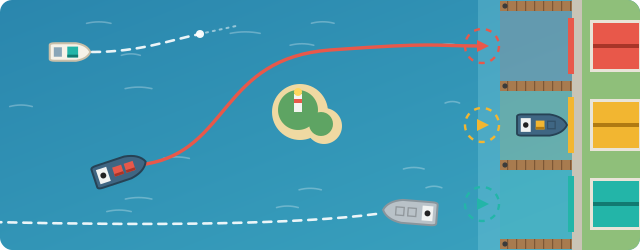 A solid line in a berth's color means the ship will dock by itself; a dashed line ends in open water, and empty grey ships head off the map.
One mistake ends the shift
Any two hulls touching — at sea or in a berth — or a ship hitting the shore, a pier, the island, or the rock ends the game. A pulsing red ring warns you when two ships get too close. Only one ship fits in a berth at a time. Traffic gets faster and denser as your score climbs, with rush hours and short breathers.
Whirlpools
Later in a shift, whirlpools form in open water. A ship that sails into one loses its route, gets pulled toward the center, and drifts straight on until you draw it a new course.
