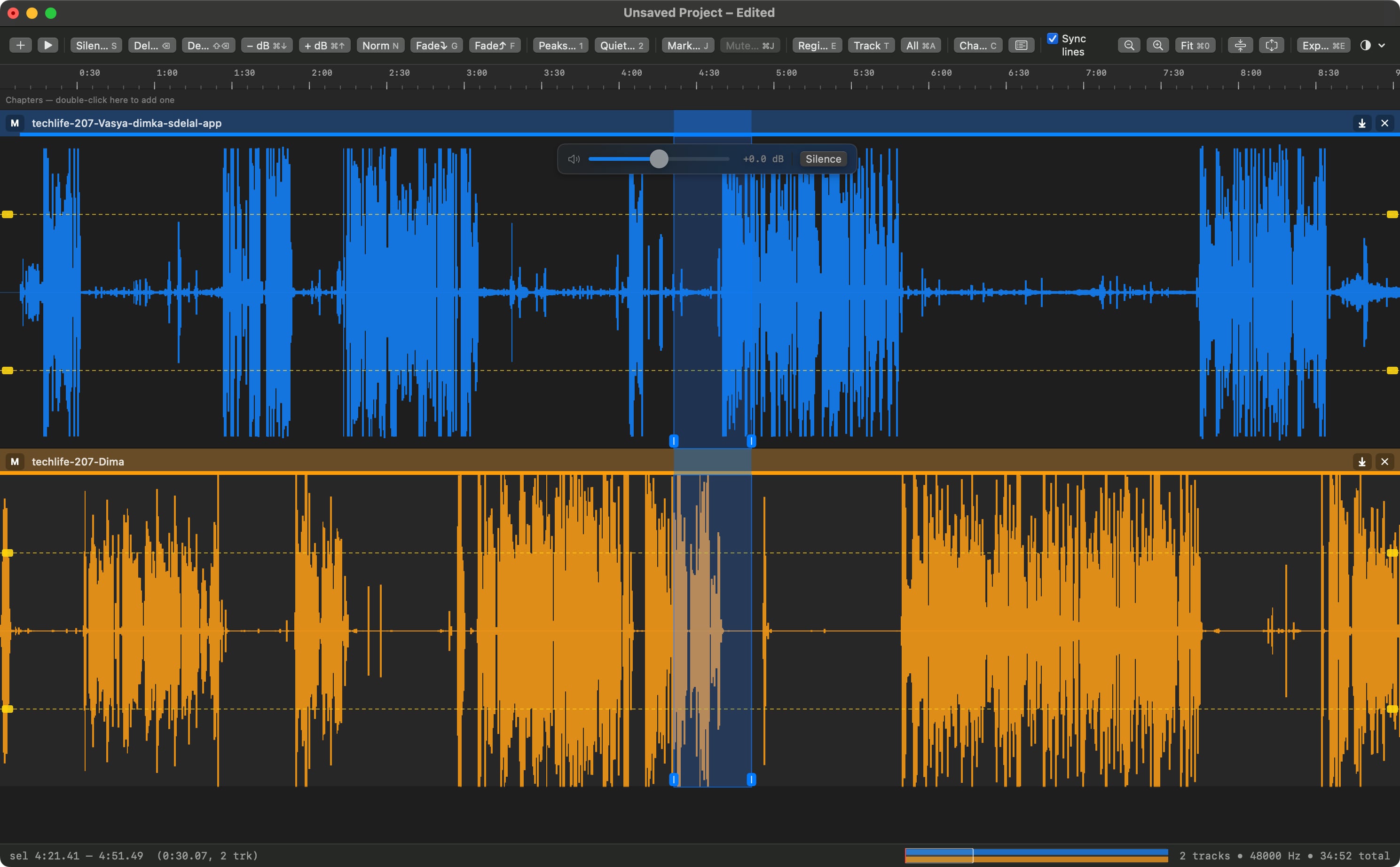
I made this native Mac app to clean recorded podcast tracks before publishing them. One tool — select — a handful of destructive edits, level-line leveling, and WAV, M4A, or MP3 export. Nothing else.
Drop files from the Finder and they are tracks. Click is always select: a click puts the cursor down, a drag makes a region, dragging across rows spans tracks. Every command in the app acts on that. Projects are optional; save a .tcproj later if you want one.
Getting the tracks straight
Multi-track by default
Every voice stays on its own track — host, guests, music — each with its own color, level line and mute. Edit one without touching the others, or select a region straight across all of them at once.
Drop the files in and start
No import wizard, no project to set up first, no format to pick. Drag recordings from the Finder into the window and they are tracks, resampled to match and ready to cut. Save as a project later, if you want one.
One tool: click is always select
There are no tool modes to switch between. Click puts the cursor down, drag makes a region, dragging across rows spans tracks — and every command in the app acts on that selection.
Alignment that finds itself
Recorders never start together. Auto-Align lines every track up against the first one by matching their loudness envelopes, using file timestamps to narrow the search — or drag a track's grab bar to nudge it by hand.
Overlaps pulled apart
When two people talk over each other, select the crossfire on both tracks and Remove Overlap replays it in turn: one speaker keeps their place, the other slides after them, and everything downstream stays in sync.
Cleaning it up
Noise reduction, two ways
Reduce noise straight from a selection — the floor is estimated from its own quietest parts — or capture a profile from a stretch of room tone and apply that voice's profile wherever you need it.
Clicks, breaths and dead air, found for you
A scan marks mouth clicks, breaths, throat clears and quiet stretches, each in its own color. Nothing is applied until you look: click any mark to veto it, then treat a whole category at once with room tone, silence, or a gentle reduction.
Levels without a mixer
Drag the level line to where the track should sit, then pull peaks down to it or lift quiet passages up to it. A floating slider applies gain live as you drag, and Auto-Level walks the whole episode toward an even loudness.
Cutting that keeps its shape
Delete and close the gap, delete and keep the timing, silence, fade, split, trim dead air from the ends. Drag a region somewhere else to overwrite — hold Shift and it ripples in instead. Everything is undoable, twenty-four steps deep.
Turning it into an episode
Podcast chapters
Press C while listening and a chapter mark lands at the cursor without breaking playback; name them afterwards in the chapter list. Marks divide the episode, so the audio before the first one is a chapter too — chapter one always starts at 0:00.
Export aimed at podcasts
WAV, M4A, or MP3, in stereo, mono, or joined stereo that puts one voice in each ear. The MP3 encoder is built into Pro, so nothing needs installing. Export the whole mix or just the selected region — and hand the chapters to your host as a chapters.json file written beside the audio.
The workshop around it
Shortcuts you can actually change
Every command in the app is on a key, and every one of those keys is yours to rebind — press the combination you want and it takes effect at once, with a warning if two commands would collide.
Projects that don't lose your work
A project is one Finder document holding lossless audio per track plus your placement, level lines and chapters. Saves are staged, verified and only then swapped in, so a full disk or a crash can never leave you with half a project.
Tunable to your voice
The thresholds behind every detector are in Settings, in plain numbers you can move: how quiet counts as quiet, how sharp a click has to be, how much a breath is softened. If a scan marks too much on your material, tune it instead of undoing it.
Native, offline, and yours
A small Mac app built on Apple's own frameworks, with no third-party dependencies, no account, and no network. Your recordings never leave the machine, and there is nothing to subscribe to.
Needs macOS 13 Ventura or later. If you want a copy, write to [email protected].